456 lines
29 KiB
Markdown
456 lines
29 KiB
Markdown
<p align="center">
|
||
<a href="https://getartcraft.com/">
|
||
<picture>
|
||
<source media="(prefers-color-scheme: dark)" srcset="docs/brand/artcraft-logo-white.svg">
|
||
<img alt="ArtCraft" src="docs/brand/artcraft-logo.svg" width="200">
|
||
</picture>
|
||
</a>
|
||
</p>
|
||
|
||
|
||
<h1 align="center">LightCraft</h1>
|
||
|
||
<h3 align="center">Your photos. Your pixels. Your machine.</h3>
|
||
|
||
<p align="center">
|
||
<b>Photo library and raw development; an open-source, clean-room reimplementation of Adobe Lightroom, rebuilt in pure Rust.</b><br>
|
||
Native on macOS, Windows and Linux. In the browser via WebAssembly. Drivable end to end by AI agents over MCP.
|
||
</p>
|
||
|
||
<p align="center">
|
||
<img alt="Pure Rust" src="https://img.shields.io/badge/pure-Rust-f2a516?style=flat-square&logo=rust&logoColor=white">
|
||
<img alt="macOS, Windows, Linux and Web" src="https://img.shields.io/badge/macOS%20%C2%B7%20Windows%20%C2%B7%20Linux%20%C2%B7%20Web-8a5800?style=flat-square">
|
||
<img alt="MCP server included" src="https://img.shields.io/badge/MCP-ready-8a5800?style=flat-square">
|
||
<img alt="License: MIT OR Apache-2.0" src="https://img.shields.io/badge/license-MIT%20OR%20Apache--2.0-8a5800?style=flat-square">
|
||
<a href="ROADMAP.md"><img alt="Status: young and moving fast" src="https://img.shields.io/badge/status-young%20%26%20moving%20fast-f2a516?style=flat-square"></a>
|
||
</p>
|
||
|
||
<p align="center">
|
||
<a href="https://discord.gg/artcraft"><img alt="Join the ArtCraft community on Discord" src="https://img.shields.io/badge/Join%20us%20on%20Discord-5865F2?style=for-the-badge&logo=discord&logoColor=white" height="40"></a>
|
||
</p>
|
||
|
||
<p align="center">
|
||
<a href="https://getartcraft.com/apps/lightcraft"><b>LightCraft on getartcraft.com</b></a> ·
|
||
<a href="https://getartcraft.com/">ArtCraft</a> ·
|
||
<a href="https://getartcraft.com/apps">All Crafting Apps</a>
|
||
</p>
|
||
|
||
<br>
|
||
|
||
<p align="center">
|
||
<img src="docs/images/hero-tetons.jpg" alt="LightCraft's Edit view with Ansel Adams' The Tetons and the Snake River in the loupe, the Light and Effects panels open on the right, and the four showcase photos in the filmstrip" width="100%">
|
||
<br>
|
||
<sub><i>Ansel Adams, "The Tetons and the Snake River" (1942). Public domain, U.S. National Archives. Developed in LightCraft.</i></sub>
|
||
</p>
|
||
|
||
> [!NOTE]
|
||
> **ArtCraft is a community of artists from all walks of life.** Digital, generative, music,
|
||
> games — if you make things, you're one of us. **[Come say hi on Discord](https://discord.gg/artcraft).**
|
||
|
||
<p align="center">
|
||
<a href="#edit-like-you-mean-it">Editing</a> ·
|
||
<a href="#color-grading-the-cinematic-way">Color grading</a> ·
|
||
<a href="#before--after">Before & after</a> ·
|
||
<a href="#masking-that-goes-where-you-point">Masking</a> ·
|
||
<a href="#presets-profiles--the-color-mixer">Presets</a> ·
|
||
<a href="#organize-everything">Library</a> ·
|
||
<a href="#built-for-agents">Agents & MCP</a> ·
|
||
<a href="#fast-native-private">Performance</a> ·
|
||
<a href="#feature-status">Status</a> ·
|
||
<a href="#quick-start">Quick start</a> ·
|
||
<a href="ROADMAP.md">Roadmap</a> ·
|
||
<a href="#the-crafting-apps">Crafting Apps</a>
|
||
</p>
|
||
|
||
<br>
|
||
|
||
## Edit like you mean it
|
||
|
||
LightCraft is a complete darkroom in a single native app. Every adjustment is **non-destructive**, so your originals
|
||
are never touched. Every slider renders through a **scene-referred, wide-gamut, 32-bit float pipeline**: highlights
|
||
roll off like film, shadows open up without halos, and colour stays clean from capture to export.
|
||
|
||
<table>
|
||
<tr>
|
||
<td width="50%" valign="top">
|
||
|
||
### ☀️ Light
|
||
**Exposure, Contrast, Highlights, Shadows, Whites, Blacks**, with edge-aware local tone mapping (a guided filter on
|
||
log-luminance). Pulling −100 Highlights recovers a blown sky without the grey halos you'd get from a naive curve.
|
||
|
||
### 🎨 Color
|
||
**White balance** by temperature and tint (Kelvin for raw, relative for JPEG) with presets, Auto and a
|
||
click-to-neutralise **eyedropper**. **Vibrance** that protects skin tones, **Saturation**, an 8-band **Color Mixer**
|
||
(hue / saturation / luminance) and 3-way **Color Grading** wheels with blending and balance. All of it is computed in
|
||
OkLCh, a modern perceptual colour space.
|
||
|
||
</td>
|
||
<td width="50%" valign="top">
|
||
|
||
### ✨ Effects
|
||
**Texture** for fine detail, **Clarity** for mid-tone punch, **Dehaze** (dark-channel prior with guided refinement;
|
||
push it negative to add atmosphere), post-crop **Vignette** with highlight priority, roundness and feather, and
|
||
resolution-independent film **Grain** with size and roughness.
|
||
|
||
### 📈 Tone Curve
|
||
Parametric region curve with movable splits **plus** point curves for RGB, Red, Green and Blue. Curves are monotone by
|
||
construction, so you never get an accidental tone inversion.
|
||
|
||
</td>
|
||
</tr>
|
||
</table>
|
||
|
||
<p align="center">
|
||
<img src="docs/images/curve-tetons.jpg" alt="The Tone Curve open under the Light panel, with a gentle S-curve on the RGB point curve applied to The Tetons and the Snake River" width="100%">
|
||
<br>
|
||
<sub>A gentle S on the RGB point curve, right under the Light sliders. <i>Ansel Adams, 1942 (public domain).</i></sub>
|
||
</p>
|
||
|
||
<br>
|
||
|
||
## Color grading, the cinematic way
|
||
|
||
Split-tone shadows, midtones and highlights independently with drag-anywhere colour wheels. Below, Dorothea Lange's
|
||
*Migrant Mother* gets a warm, print-like tone (highlights at 42°, shadows at 28°) in two drags.
|
||
|
||
<p align="center">
|
||
<img src="docs/images/grading-migrant-mother.jpg" alt="Color Grading wheels for midtones, shadows and highlights next to Dorothea Lange's Migrant Mother, toned warm like a print" width="100%">
|
||
<br>
|
||
<sub>Shadows, midtones and highlights wheels in the Color panel. <i>Dorothea Lange, "Migrant Mother" (1936). Public domain, Library of Congress.</i></sub>
|
||
</p>
|
||
|
||
<br>
|
||
|
||
## Before & after
|
||
|
||
Hold <kbd>\\</kbd> to peek at the original, press <kbd>Y</kbd> for side by side, or <kbd>Shift</kbd>+<kbd>Y</kbd> for a
|
||
split view. Every image below is a real screenshot of LightCraft, captured automatically by an agent through the
|
||
[control channel](#built-for-agents).
|
||
|
||
<table>
|
||
<tr>
|
||
<td width="50%"><img src="docs/images/ba-tetons.jpg" alt="Side-by-side before and after of The Tetons and the Snake River: the after has deeper clouds and more open shadows along the river"><br><sub><b>The Tetons and the Snake River.</b> Highlights −45, Shadows +38, Clarity +28, Dehaze +18. <i>Ansel Adams, 1942 (public domain).</i></sub></td>
|
||
<td width="50%"><img src="docs/images/ba-migrant-mother.jpg" alt="Side-by-side before and after of Migrant Mother: the after is warmer, with lifted shadows"><br><sub><b>Migrant Mother.</b> Shadows +42, Texture +18, split-toned grade, vignette. <i>Dorothea Lange, 1936 (public domain).</i></sub></td>
|
||
</tr>
|
||
<tr>
|
||
<td width="50%"><img src="docs/images/ba-earthrise.jpg" alt="Side-by-side before and after of Earthrise: the Earth over the lunar horizon, the after slightly warmer and richer"><br><sub><b>Earthrise.</b> Dehaze +22, Highlights −30, warmer white balance, Vibrance +22. <i>NASA / Bill Anders, Apollo 8, 1968 (public domain).</i></sub></td>
|
||
<td width="50%"><img src="docs/images/ba-blue-marble.jpg" alt="Side-by-side before and after of The Blue Marble: the after has deeper blacks and firmer cloud detail"><br><sub><b>The Blue Marble.</b> Highlights −38, Blacks −20, Dehaze +15, Vibrance +30. <i>NASA, Apollo 17, 1972 (public domain).</i></sub></td>
|
||
</tr>
|
||
</table>
|
||
|
||
<br>
|
||
|
||
## Masking that goes where you point
|
||
|
||
Paint with a **Brush** (size, feather, flow, density, erase), drop **Linear** and **Radial Gradients** with draggable
|
||
pins, or select by **Luminance Range**, **Color Range**, **Sky**, **Subject** and **Background**. Combine components
|
||
with **Add / Subtract / Intersect**, invert any of them, and dial in 15 local adjustments per mask (Temp, Tint,
|
||
Exposure, Contrast, Highlights, Shadows, Whites, Blacks, Texture, Clarity, Dehaze, Hue, Saturation, Sharpness, Noise)
|
||
plus an overall Amount.
|
||
|
||
<p align="center">
|
||
<img src="docs/images/masking.jpg" alt="Masking panel with a linear Sky mask and a radial Sun glow mask; the radial gradient is drawn as a red overlay around the sun on a lake scene" width="100%">
|
||
<br>
|
||
<sub>A radial "Sun glow" mask (Temp +40, Exposure +0.50) layered over a linear "Sky" mask. <i>Photo from LightCraft's procedurally generated demo library.</i></sub>
|
||
</p>
|
||
|
||
<br>
|
||
|
||
## Presets, profiles & the Color Mixer
|
||
|
||
Eighteen hand-built presets ship in the box (*Golden Hour, Teal & Orange, Faded Matte, Selenium Tone, Crisp
|
||
Landscape* and more), each with an **Amount** slider from 0 to 200 %. Save your own from any group of settings, mark
|
||
favourites, and copy, paste or sync edits across a whole selection with exactly the groups you choose.
|
||
|
||
<p align="center">
|
||
<img src="docs/images/presets-mixer.jpg" alt="Presets column grouped into B&W, Color, Film, Landscape, Portrait and Style, beside the Color panel with the 8-band Color Mixer open on purple" width="100%">
|
||
<br>
|
||
<sub>The Presets column next to the 8-band Color Mixer. <i>Photo from the demo library.</i></sub>
|
||
</p>
|
||
|
||
<table>
|
||
<tr>
|
||
<td width="50%" valign="top">
|
||
|
||
### ✂️ Crop, straighten & geometry
|
||
Free or locked aspect ratios (1:1, 4:5, 5:7, 2:3, 4:3, 16:9, 16:10, original), drag-to-rotate straightening that always
|
||
keeps the largest crop inside the image, thirds / grid / golden-ratio overlays, flips and 90° rotations, plus
|
||
manual Vertical, Horizontal, Rotate, Aspect, Scale and Offset transforms.
|
||
|
||
</td>
|
||
<td width="50%" valign="top">
|
||
|
||
### ⚫️ Black & White
|
||
One click (<kbd>V</kbd>) to monochrome, with an 8-band **B&W Mix** that lets you darken skies or make foliage glow.
|
||
Then tone it with Color Grading for selenium, sepia or split-tone prints.
|
||
|
||
</td>
|
||
</tr>
|
||
<tr>
|
||
<td width="50%"><img src="docs/images/crop-tetons.jpg" alt="Crop tool on The Tetons and the Snake River: a 16 by 9 crop rotated slightly, with a rule-of-thirds overlay and the Geometry sliders on the right"><br><sub>A 16:9 crop straightened +2.5° with the thirds overlay. <i>Ansel Adams, 1942 (public domain).</i></sub></td>
|
||
<td width="50%"><img src="docs/images/bw-split.jpg" alt="Split before and after view of sand dunes: color on the left, black and white with grain and vignette on the right"><br><sub>Split view: colour original on the left, B&W with Clarity, Vignette and Grain on the right. <i>Demo library.</i></sub></td>
|
||
</tr>
|
||
</table>
|
||
|
||
<br>
|
||
|
||
## Organize everything
|
||
|
||
A library that stays out of your way: **All Photos**, **Recently Added**, **Picks**, **By Date**, **Albums** nested in
|
||
**Folders**, and **Recently Deleted**. Rate with <kbd>0</kbd>–<kbd>5</kbd>, flag with <kbd>P</kbd> / <kbd>X</kbd> /
|
||
<kbd>U</kbd>, colour-label with <kbd>6</kbd>–<kbd>9</kbd>. Search understands fields:
|
||
`rating:>3 flag:pick iso:>800 camera:x2 date:2026-04 keyword:mountains`. Every view sorts by capture date,
|
||
import date, edit date, name, rating or size. The justified **Photo Grid** and **Square Grid** views are virtualized,
|
||
so they stay smooth whether you have forty photos or forty thousand.
|
||
|
||
<table>
|
||
<tr>
|
||
<td width="50%"><img src="docs/images/grid-demo.jpg" alt="Justified Photo Grid of 24 demo photos with ratings and flags, and a sidebar of nested albums under a Travel 2026 folder"><br><sub>Photo Grid with albums nested in a folder, ratings and flags. <i>Demo library.</i></sub></td>
|
||
<td width="50%"><img src="docs/images/grid-pd.jpg" alt="Square Grid showing the four public-domain showcase photos with star ratings and pick flags"><br><sub>Square Grid of the four public-domain showcase photos.</sub></td>
|
||
</tr>
|
||
<tr>
|
||
<td colspan="2"><img src="docs/images/info-earthrise.jpg" alt="Info panel for Earthrise showing file name, 2400 by 2400 JPEG dimensions, rating, title field and camera metadata"><br><sub>The Info panel: file, dimensions, rating, title, caption, copyright and camera metadata. <i>NASA / Bill Anders, "Earthrise", Apollo 8, 1968 (public domain).</i></sub></td>
|
||
</tr>
|
||
</table>
|
||
|
||
<br>
|
||
|
||
## Built for agents
|
||
|
||
Every menu item, slider, brush stroke, crop handle and keystroke in LightCraft is a **command** with a stable id and
|
||
JSON parameters. The UI, the keyboard, the CLI, a JSON-lines control channel and an **MCP server** all dispatch
|
||
through the same entry point. An agent can cull a shoot, develop it, mask a sky and export it, and *see* the result.
|
||
|
||
```sh
|
||
lightcraft --control 7980 ~/Pictures/trip
|
||
```
|
||
```jsonc
|
||
{"method": "engine.execute", "params": {"command": "photo.flag", "params": {"flag": "pick"}}}
|
||
{"method": "engine.execute", "params": {"command": "develop.set", "params": {"values": {"light.highlights": -45, "light.shadows": 38}}}}
|
||
{"method": "engine.execute", "params": {"command": "mask.add", "params": {"kind": "radial", "center": [0.62, 0.4], "rx": 0.2, "ry": 0.14}}}
|
||
{"method": "ui.clickWidget", "params": {"id": "slider:effects.clarity"}} // drive any widget by name
|
||
{"method": "ui.pointer", "params": {"events": [{"kind":"down","x":0.2,"y":0.3}, {"kind":"up","x":0.4,"y":0.3}]}}
|
||
{"method": "ui.screenshot", "params": {"path": "after.png"}}
|
||
```
|
||
|
||
- **91 engine commands** and **48 UI commands.** List them all with `engine.commands`; read every slider's range,
|
||
default and current value with `develop.controls`.
|
||
- **MCP server.** `lightcraft-cli mcp` gives Claude (or any MCP client) ~100 tools: import, query, develop, mask,
|
||
render (returned as an image), export. It runs headless, or attached to the running app with screenshots, clicks
|
||
and gestures. See [docs/mcp.md](docs/mcp.md).
|
||
|
||
```sh
|
||
cargo build --release -p lightcraft-cli
|
||
claude mcp add lightcraft -- "$PWD/target/release/lightcraft-cli" mcp ~/Pictures/shoot # headless
|
||
claude mcp add lightcraft-app -- "$PWD/target/release/lightcraft-cli" mcp --connect 127.0.0.1:7980 # live app
|
||
```
|
||
- **Scriptable CLI:** `lightcraft-cli run --import in.dng develop.set control=light.exposure value=0.7 app.export
|
||
path=out.jpg longEdge=2048` runs any chain of commands (headless, on a saved library, or against the running app)
|
||
and prints one JSON result per command; `lightcraft-cli render in.dng -o out.jpg --set light.exposure=0.7 --preset …`.
|
||
- **Undo for everything**, including agent actions: a slider drag (or a scripted burst of updates) is one undo step.
|
||
- **Every widget is addressable** (`ui.widgets`) and clickable by name, so agents operate the real UI, not a
|
||
side door.
|
||
- The screenshots in this README were produced end to end by the [`docs/showcase/`](docs/showcase/) scripts.
|
||
Protocol reference: [docs/control-protocol.md](docs/control-protocol.md).
|
||
|
||
<br>
|
||
|
||
## Fast, native, private
|
||
|
||
- **Pure Rust, no C.** Our own RAW decoders (DNG, Canon CR2, Sony ARW, Nikon NEF, Fujifilm RAF incl. X-Trans,
|
||
Panasonic RW2, Pentax PEF, Olympus ORF), our own colour science, our own pipeline. JPEG, PNG, TIFF, WebP, PSD
|
||
composites and JPEG XL open today.
|
||
- **Scene-referred & wide-gamut.** Linear Rec.2020 float internally, Bradford-adapted white balance, gamut mapping
|
||
instead of clipping, a filmic shoulder for raw and pixel-exact pass-through for JPEGs you haven't touched.
|
||
- **Resolution-independent edits.** Radii and brush sizes are relative to the image, so a 400 px preview, your
|
||
5K display and a 60 MP export look the same.
|
||
- **GPU-accelerated, CPU-exact.** The whole develop pipeline runs as wgpu compute kernels (Metal / Vulkan / DX12),
|
||
checked against the CPU pipeline to within 1/255. On a 24 MP raw (Apple M4 Pro): a slider update re-renders in
|
||
~4 ms, a cold 2.5 MP loupe in ~30 ms, and a full-size export in ~0.3 s including a parallel JPEG encode.
|
||
Without a GPU the same pipeline runs on all CPU cores, redoing only the stages a slider affects.
|
||
- **Instant culling.** Opening a raw shows its embedded camera preview or cached render within ~0.1 s while the
|
||
full render follows (~0.2–0.5 s for 24 MP). The next and previous photos are prepared in the background, so stepping
|
||
through a shoot takes ~50 ms per photo.
|
||
- **Background rendering.** A worker pool renders the loupe, before/after and every visible thumbnail off the UI
|
||
thread: drafts during drags, full quality on release.
|
||
- **Local-first.** No account, no cloud, no telemetry, no subscription. Your catalog is an append-only log of
|
||
human-readable operations you can diff, back up or replay.
|
||
|
||
<br>
|
||
|
||
## Feature status
|
||
|
||
LightCraft is young and moving fast. **Where we honestly stand** (details in the [roadmap](ROADMAP.md#where-we-stand)):
|
||
|
||
- **By feature count we're at ~79%** of Lightroom (core features 98%), tracked row by row in
|
||
[docs/parity.md](docs/parity.md).
|
||
- **As a day-to-day Lightroom replacement we're nearer 60–70%.** It's great for JPEG/DNG and most Nikon / Sony /
|
||
older-Canon raws on one machine.
|
||
- **The biggest gaps:**
|
||
- **camera colour calibration:** raws other than DNG develop with a neutral colour matrix today, so colour is muted;
|
||
- **CR3 and compressed Fujifilm / Olympus raws:** these open as embedded previews only;
|
||
- **AI masks and denoise:** subject and sky selection are classical heuristics;
|
||
- **HDR, video and the Classic Print / Book / Map modules.**
|
||
- **What's next:** see [where we're going](ROADMAP.md#where-were-going).
|
||
|
||
| Area | Status |
|
||
|---|---|
|
||
| Library: albums, folders, smart albums, stacks (incl. auto-stack), virtual copies, ratings, flags, labels, filter bar, search, sort, grids, filmstrip | ✅ |
|
||
| Culling: Compare (synced zoom) and Survey views, auto-advance, instant previews | ✅ |
|
||
| Light, Color, Effects (vignette styles), Tone Curve (+ refine saturation, targeted adjustment), Color Mixer (+ targeted), Point Color, Color Grading, Calibration, B&W | ✅ |
|
||
| Masking: brush, linear, radial, luminance/colour range, add/subtract/intersect | ✅ (AI subject/sky use classical heuristics for now) |
|
||
| Crop, straighten tool + auto straighten, flip, rotate, aspect ratios, overlays | ✅ |
|
||
| Profiles (Color, Neutral, Vivid, Landscape, Portrait, Monochrome: our own looks), presets, versions, history, copy/paste/sync settings | ✅ |
|
||
| Camera colour: DNG files use their own matrices | ✅ · our own calibration for other raws ⬜ (top priority; neutral fallback today) |
|
||
| Native macOS menu bar (generated from the command registry), control channel + every widget addressable, headless UI snapshots | ✅ |
|
||
| RAW: DNG, CR2, ARW, NEF (uncompressed + lossless/lossy compressed), Fujifilm RAF (uncompressed, Bayer + X-Trans), Panasonic RW2, Pentax PEF, Olympus ORF (uncompressed); embedded previews for every format incl. CR3 | ✅ · CR3, compressed RAF/ORF decode ⬜ |
|
||
| Detail: sharpening, luminance + colour noise reduction | ✅ · AI Denoise, Super Resolution ⬜ |
|
||
| Remove / Heal / Clone spots (auto source), Visualize Spots, Red Eye and Pet Eye (auto pupil detection, catchlight) | ✅ · content-aware fill, spot pin editing 🚧 |
|
||
| Export: JPEG / PNG / TIFF / WebP / AVIF / DNG / original, sizing, file-size limit, output sharpening, naming templates, batch, metadata policy, text or image watermark | ✅ · HDR export ⬜ |
|
||
| Library persistence (crash-safe op log + snapshots, background compaction, failed saves reported), disk thumbnail cache | ✅ |
|
||
| Import: Add in place / Copy / Move, rename and folder templates, devices, duplicate detection, watched folders; Local folder browsing | ✅ |
|
||
| MCP server (headless or live app, persistent libraries), CLI, control channel | ✅ |
|
||
| XMP sidecars (read/write, auto-write), reading `crs:` develop settings, preset files (`.lcpreset`, XMP presets) | ✅ |
|
||
| Optics (distortion, vignetting, auto + manual CA, defringe, DNG-embedded lens corrections), Geometry (transforms, Constrain Crop), Upright (Auto/Level/Vertical/Full/Guided) | ✅ · camera lens profiles (our own) ⬜ |
|
||
| Photo Merge: HDR (auto-align, deghost), Panorama (spherical/cylindrical/perspective, boundary warp, auto crop), HDR Panorama → DNG | ✅ |
|
||
| GPU pipeline (wgpu compute, CPU-exact within 1/255), CPU fallback on device limits / errors | ✅ · WebGPU in the browser 🚧 |
|
||
| AI: segmentation masks, AI denoise, super resolution, faces; HDR editing; video | ⬜ (see [roadmap](ROADMAP.md#where-were-going)) |
|
||
| Web build (same UI in the browser via WASM): persistent library in OPFS/IndexedDB, Web Worker rendering, export downloads | ✅ · WebGPU, Safari/Firefox testing 🚧 |
|
||
|
||
<sub>✅ works today · 🚧 in progress · ⬜ not started</sub>
|
||
|
||
<br>
|
||
|
||
## Quick start
|
||
|
||
```sh
|
||
git clone https://github.com/storytold/lightcraft && cd lightcraft
|
||
cargo run --release -p lightcraft # opens your library (~/Pictures/LightCraft Library; a new one starts with demo photos)
|
||
cargo run --release -p lightcraft -- ~/Pictures/trip # import your photos (folders are scanned, duplicates skipped)
|
||
cargo run --release -p lightcraft -- --memory # a throwaway in-memory demo session (writes nothing)
|
||
cargo run --release -p lightcraft -- --control 7980 # with the automation channel
|
||
cargo xtask web --serve # the same app in the browser: http://127.0.0.1:8080/
|
||
cargo run --release -p lightcraft-cli -- render photo.jpg -o out.jpg --set light.exposure=0.5
|
||
cargo xtask ci # fmt, clippy, tests, layering, wasm checks
|
||
```
|
||
|
||
**Chinese and Japanese text** need the shared font repo, an optional build input (official releases always include it):
|
||
|
||
```sh
|
||
git clone https://github.com/storytold/craft-fonts ../craft-fonts
|
||
CRAFT_FONTS_DIR=../craft-fonts cargo run --release -p lightcraft
|
||
```
|
||
|
||
Without it LightCraft builds and runs the same, but Chinese and Japanese text have no glyphs. Fonts are never committed to this
|
||
repo; see [craftrules `standards/fonts.md`](https://github.com/storytold/craftrules/blob/main/standards/fonts.md).
|
||
|
||
**Interface language:** **Edit → Language** (English, 简体中文, 繁體中文(台灣), 日本語) or **Settings → General →
|
||
Language**; the choice applies immediately and persists. See [docs/localization.md](docs/localization.md).
|
||
|
||
The web build needs the `wasm32-unknown-unknown` target and the matching `wasm-bindgen` CLI
|
||
(`cargo xtask web` prints the exact install command); see [docs/web.md](docs/web.md).
|
||
|
||
**Keyboard:** <kbd>G</kbd> grid · <kbd>D</kbd> detail · <kbd>E</kbd> edit · <kbd>C</kbd> crop · <kbd>M</kbd> masking ·
|
||
<kbd>Shift</kbd>+<kbd>P</kbd> presets · <kbd>\\</kbd> original · <kbd>Y</kbd> before/after · <kbd>Z</kbd> zoom ·
|
||
<kbd>J</kbd> clipping · <kbd>⌘Z</kbd> undo · <kbd>⌘/</kbd> all shortcuts.
|
||
|
||
## How it's built
|
||
|
||
An engine-first Cargo workspace of small, tested crates with enforced layering (`cargo xtask layers`): `geom`,
|
||
`color`, `raster`, `tiff` → `raw`, `codecs`, `meta`, `develop` → `pipeline` → `catalog` → `engine` → `ui-egui`. The
|
||
egui frontend is one swappable crate; nothing below it knows a UI exists. `mcp` and the apps (`lightcraft`,
|
||
`lightcraft-cli`) sit on top of `engine`.
|
||
|
||
## Contributing
|
||
|
||
Humans and agents follow the same rules, so read [AGENTS.md](AGENTS.md) first. The short version:
|
||
|
||
- **Clean-room.** Never read Adobe binaries or GPL raw/photo code (darktable, RawTherapee, LibRaw, rawspeed, dcraw…);
|
||
work from public specs and black-box observation.
|
||
- **No Adobe assets, ever:** no icons, screenshots, presets, profiles, LUTs or fonts from Adobe products. Every
|
||
image, icon and font in the repo is original, public domain, Creative Commons, OFL or permissively licensed, and has
|
||
an entry in [assets/ATTRIBUTION.md](assets/ATTRIBUTION.md) added in the same commit. New fonts go to
|
||
[storytold/craft-fonts](https://github.com/storytold/craft-fonts), not here.
|
||
- **Pure Rust**, enforced crate layering, everything is a command, and `cargo xtask ci` green before every commit
|
||
(one task id per commit).
|
||
- **Never crash.** Non-test code returns errors instead of panicking: no `unwrap()`, `expect()`, `panic!` or
|
||
`unsafe`, checked indexing on anything derived from input, and a regression test with every crash fix. Details in
|
||
[AGENTS.md](AGENTS.md#never-crash-outranks-feature-work).
|
||
|
||
Questions, ideas or a bug you'd like to talk through first? Bring them to [Discord](https://discord.gg/artcraft).
|
||
|
||
<br>
|
||
|
||
## The Crafting Apps
|
||
|
||
LightCraft is one of the **Crafting Apps**: free, open-source creative tools from the
|
||
[ArtCraft](https://getartcraft.com/) team, each written from scratch in Rust and each able to
|
||
stand on its own.
|
||
|
||
| | App | What it's for | Code | Learn more |
|
||
|:-:|---|---|---|---|
|
||
| <img src="https://raw.githubusercontent.com/storytold/photocraft/main/assets/app-icon/hicolor/64x64/apps/ai.storyteller.photocraft.png" alt="" width="32" height="32"> | **PhotoCraft** | Image editing: layers, masks, type and real PSD files | [GitHub](https://github.com/storytold/photocraft) | [Website](https://getartcraft.com/apps/photocraft) |
|
||
| <img src="https://raw.githubusercontent.com/storytold/vectorcraft/main/assets/app-icon/hicolor/64x64/apps/ai.storyteller.vectorcraft.png" alt="" width="32" height="32"> | **VectorCraft** | Vector illustration | [GitHub](https://github.com/storytold/vectorcraft) | [Website](https://getartcraft.com/apps/vectorcraft) |
|
||
| <img src="https://raw.githubusercontent.com/storytold/filmcraft/main/assets/app-icon/hicolor/64x64/apps/ai.storyteller.filmcraft.png" alt="" width="32" height="32"> | **FilmCraft** | Video editing, color and sound | [GitHub](https://github.com/storytold/filmcraft) | [Website](https://getartcraft.com/apps/filmcraft) |
|
||
| <img src="https://raw.githubusercontent.com/storytold/lightcraft/main/assets/app-icon/hicolor/64x64/apps/ai.storyteller.lightcraft.png" alt="" width="32" height="32"> | **LightCraft** | **Photo library and raw development · you are here** | [GitHub](https://github.com/storytold/lightcraft) | [Website](https://getartcraft.com/apps/lightcraft) |
|
||
| <img src="https://raw.githubusercontent.com/storytold/pdfcraft/main/assets/app-icon/hicolor/64x64/apps/ai.storyteller.pdfcraft.png" alt="" width="32" height="32"> | **PdfCraft** | Reading, organizing and protecting PDFs | [GitHub](https://github.com/storytold/pdfcraft) | [Website](https://getartcraft.com/apps/pdfcraft) |
|
||
| <img src="https://raw.githubusercontent.com/storytold/effectcraft/main/assets/app-icon/hicolor/64x64/apps/ai.storyteller.effectcraft.png" alt="" width="32" height="32"> | **EffectCraft** | Motion graphics and visual effects | [GitHub](https://github.com/storytold/effectcraft) | [Website](https://getartcraft.com/apps/effectcraft) |
|
||
| <img src="https://raw.githubusercontent.com/storytold/designcraft/main/assets/app-icon/hicolor/64x64/apps/ai.storyteller.designcraft.png" alt="" width="32" height="32"> | **DesignCraft** | Page layout and publishing | [GitHub](https://github.com/storytold/designcraft) | [Website](https://getartcraft.com/apps/designcraft) |
|
||
|
||
And [**ArtCraft**](https://getartcraft.com/) itself, our AI image and video studio for artists who want real control.
|
||
|
||
<br>
|
||
|
||
<p align="center">
|
||
<a href="https://discord.gg/artcraft"><img alt="Join the ArtCraft community on Discord" src="https://img.shields.io/badge/Join%20us%20on%20Discord-5865F2?style=for-the-badge&logo=discord&logoColor=white" height="40"></a>
|
||
</p>
|
||
|
||
<h3 align="center">Come make things with us</h3>
|
||
|
||
<p align="center">
|
||
Our Discord is where artists of every kind hang out: people who paint, shoot, draw, cut film,
|
||
set type, and people still figuring out what they like to make. Share what you're working on,
|
||
ask for help, tell us what's broken, or tell us what you wish these tools could do.
|
||
Whatever your medium and however long you've been at it, you're welcome here.
|
||
</p>
|
||
|
||
<p align="center">
|
||
<a href="https://discord.gg/artcraft"><b>discord.gg/artcraft</b></a> ·
|
||
<a href="https://getartcraft.com/">getartcraft.com</a> ·
|
||
<a href="https://getartcraft.com/apps">The Crafting Apps</a> ·
|
||
<a href="https://getartcraft.com/apps/lightcraft">LightCraft</a>
|
||
</p>
|
||
|
||
<br>
|
||
|
||
## License and credits
|
||
|
||
LightCraft is dual-licensed under [MIT](LICENSE-MIT) or [Apache-2.0](LICENSE-APACHE), at your option.
|
||
Copyright (c) 2026 ArtCraft Team and the LightCraft contributors. Required notices are in [NOTICE](NOTICE).
|
||
|
||
Bundled fonts, icons, images and other assets keep their own open licenses; each one is listed
|
||
with its author, source and license in [assets/ATTRIBUTION.md](assets/ATTRIBUTION.md).
|
||
|
||
Showcase photographs are public-domain works, used via Wikimedia Commons: Ansel Adams, *The Tetons and the Snake River*
|
||
(1942, U.S. National Archives); Dorothea Lange, *Migrant Mother* (1936, Library of Congress); Bill Anders / NASA,
|
||
*Earthrise* (1968); NASA, *The Blue Marble* (1972). The demo library is procedurally generated by LightCraft. UI font:
|
||
Inter (SIL OFL 1.1). Builds made with [craft-fonts](https://github.com/storytold/craft-fonts) (all official releases)
|
||
also embed its Chinese and Japanese fonts (Noto Sans CJK SC, BIZ UDPGothic, BIZ UDMincho, Shippori Mincho; SIL OFL 1.1), listed in its
|
||
[ATTRIBUTION.md](https://github.com/storytold/craft-fonts/blob/main/ATTRIBUTION.md). All icons are original.
|
||
|
||
The ArtCraft name, wordmark and logos in [`docs/brand/`](docs/brand/) are trademarks of the
|
||
ArtCraft Team and are not covered by this license. They may be used only unmodified, and only as
|
||
part of this repository and LightCraft, under [`docs/brand/LICENSE-brand.txt`](docs/brand/LICENSE-brand.txt).
|
||
Forks and modified versions must remove them.
|
||
|
||
<sub>Adobe, Photoshop, Illustrator, Premiere Pro, Lightroom, Acrobat, After Effects and InDesign are trademarks or registered trademarks of Adobe Inc. in the United States and/or other countries. LightCraft is an independent, open-source project and is not affiliated with, sponsored by or endorsed by Adobe Inc.; these names are used only to describe the workflows it is compatible with.</sub>
|
||
|
||
<p align="center">
|
||
<a href="https://getartcraft.com/"><img alt="ArtCraft" src="docs/brand/artcraft-mark.svg" width="28"></a><br>
|
||
<sub>Made by the <a href="https://getartcraft.com/">ArtCraft</a> team and community.</sub>
|
||
</p>
|
||
|
||
## Star history
|
||
|
||
[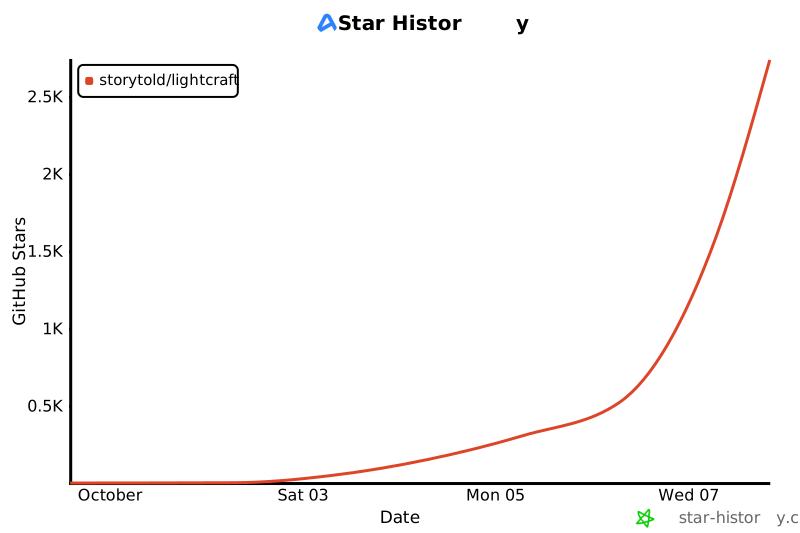](https://www.star-history.com/?repos=storytold%2Flightcraft&type=date&legend=top-left)
|